Prerequisites
This guide assumes you've completed Part 1 and have:
- A working development environment (Python, VS Code, Claude Code)
- Accounts on GitHub, Supabase, Railway, and Logfire
- Built and deployed the simple chatbot from Part 1
What You'll Learn
Concepts:
- •The 3-layer architecture for AI applications
- •Services, thin tools, and Pydantic.ai agents
- •When to use AI vs. deterministic code
- •Working efficiently with Claude Code
What You'll Build:
- •A Contact Manager with AI capabilities
- •Service layer for database operations
- •Pydantic.ai agent with tools
- •Streamlit UI deployed to Railway
1From Scripts to Systems
TL;DR
One-off scripts solve today's problem but create tomorrow's headache. Infrastructure means building reusable pieces that work together. This guide teaches you to build systems, not scripts.
The Problem with Scripts
When you first start coding, you write scripts. A script is a file that does one thing:
# get_sales.py - A script
import supabase

client = supabase.create_client(url, key)
result = client.table("sales").select("*").execute()
print(f"Total sales: {len(result.data)}")
This works! But then you need the same data in another script. So you copy-paste. Now you have two files with the same database connection code. Then you change your Supabase credentials and have to update both files. Then three files. Then ten.
This is how projects become unmaintainable.
What "Infrastructure" Means
Infrastructure is code organized so that:
- Each piece has one job (database access, data processing, user interface)
- Pieces can be reused (the database code works everywhere)
- Changes happen in one place (update credentials once, not ten times)
Think of it like Excel. You don't copy your raw data into every sheet that needs it. You keep the data in one place and reference it. Infrastructure is the same idea applied to code.
The Journey
Script          →  Tool           →  Service         →  System
"It works" "It's reusable" "It's organized" "It scales"| Stage | What it looks like |
|---|---|
| Script | One file, does one thing, copy-paste to reuse |
| Tool | A function you can call from multiple places |
| Service | A class that groups related functions with shared state |
| System | Multiple services working together through clear interfaces |
2Working Efficiently with Claude Code
TL;DR
How you communicate with Claude Code matters. Be specific, reference existing patterns, break big tasks into small ones, and know when to use which model. These habits save hours.
Communication Efficiency
Claude Code is powerful, but it works best when you're clear about what you want.
Be Specific Upfront
| Instead of... | Say... |
|---|---|
| "Add a button" | "Add a blue 'Save' button below the form that calls save_contact()" |
| "Fix the bug" | "The error is on line 42: 'NoneType has no attribute get'. The data from Supabase might be empty." |
| "Make it better" | "Refactor this function to handle the case where the user list is empty" |
Tell It What NOT to Do
Sometimes what you don't want is as important as what you do:
"Fix the data processing logic, but don't change the UI code or the database schema."
"Add error handling to this function, but keep the happy path unchanged."
Reference Existing Patterns
If you already have code that does something similar, point to it:
"Create a new ProductService following the same pattern as ContactService in services/contact_service.py"
Workflow Efficiency
Use Plan Mode for Big Features
Before building anything substantial, ask Claude Code to plan:
"Let's go into plan mode. I want to add a feature that lets users export contacts to CSV. Help me think through the approach before we write code."
Break Large Tasks into Smaller Prompts
Instead of "Build me a complete user authentication system", try a sequence of smaller requests that are each reviewable and testable.
Cost and Speed Efficiency
| Model | Best for | Speed | Cost |
|---|---|---|---|
| Haiku | Quick fixes, formatting, simple questions | Fast | Low |
| Sonnet | Most development work (default) | Medium | Medium |
| Opus | Complex reasoning, architecture decisions | Slow | High |
Tip
Start with Sonnet. Only upgrade to Opus if it's struggling with complex reasoning. Start a fresh conversation for unrelated tasks—long contexts slow things down and cost more.
3Async Basics
TL;DR
Pydantic.ai uses async/await syntax. You don't need to deeply understand it—just know that async def defines a function and await calls it. Claude Code handles the details.
Why Async?
When your code calls an API (like Claude or Supabase), it waits for a response. With regular code, your program just... sits there waiting. With async code, your program can do other things while waiting.
The Syntax
async def - Defines a function that can wait for things:
async def get_contact(contact_id: str):
    result = await db.table("contacts").select("*").eq("id", contact_id).execute()
    return result.data[0]
await - Calls an async function and waits for it:
contact = await get_contact("123")What You Need to Know
- If a function is defined with
async def, you must call it withawait - You can only use
awaitinside anasync deffunction - Pydantic.ai tools are async, so you'll see this pattern a lot
That's it. Claude Code handles the complexity. When you see async and await, just know it's about efficiently waiting for external services.
4Pydantic Models - Structured Data
TL;DR
Pydantic models define the shape of your data. Instead of hoping your data looks right, you declare what it should look like and Pydantic enforces it. This catches bugs early and makes your code self-documenting.
The Problem Pydantic Solves
LLMs return text. APIs return JSON. Databases return rows. But your code needs structured data—data with a predictable shape.
Without structure:
# What fields does this have? Who knows!
contact = get_contact_from_somewhere()
print(contact["email"])  # KeyError if "email" doesn't exist
print(contact["emal"])   # Typo - fails silently or crashes
With Pydantic:
# Crystal clear what a Contact looks like
class Contact(BaseModel):
    id: str
    name: str
    email: str
    phone: Optional[str] = None

contact = Contact(**data)  # Validates immediately
print(contact.email)  # Autocomplete works, typos caught by editor
Defining Models
from pydantic import BaseModel
from typing import Optional
from datetime import datetime

class Contact(BaseModel):
    id: str
    name: str
    email: str
    phone: Optional[str] = None  # Optional with default
    created_at: datetime
    notes: str = ""  # Optional with default empty string
Using Models with LLMs (Structured Outputs)
This is where Pydantic really shines with AI. Instead of getting messy text from an LLM, you can get structured data:
from pydantic_ai import Agent

class ContactSummary(BaseModel):
    name: str
    key_points: list[str]
    suggested_action: str

agent = Agent(
    "anthropic:claude-sonnet-4-5-20250929",
    result_type=ContactSummary  # LLM must return this structure
)

result = await agent.run("Summarize this contact: [contact details]")
# result.data is a ContactSummary, not raw text
print(result.data.suggested_action)
Excel Analogy
A Pydantic model is like defining column headers and data types in Excel. If someone tries to enter data that doesn't match (text in the date column), it's rejected. Pydantic does the same thing for your code.
5The 3-Layer Architecture
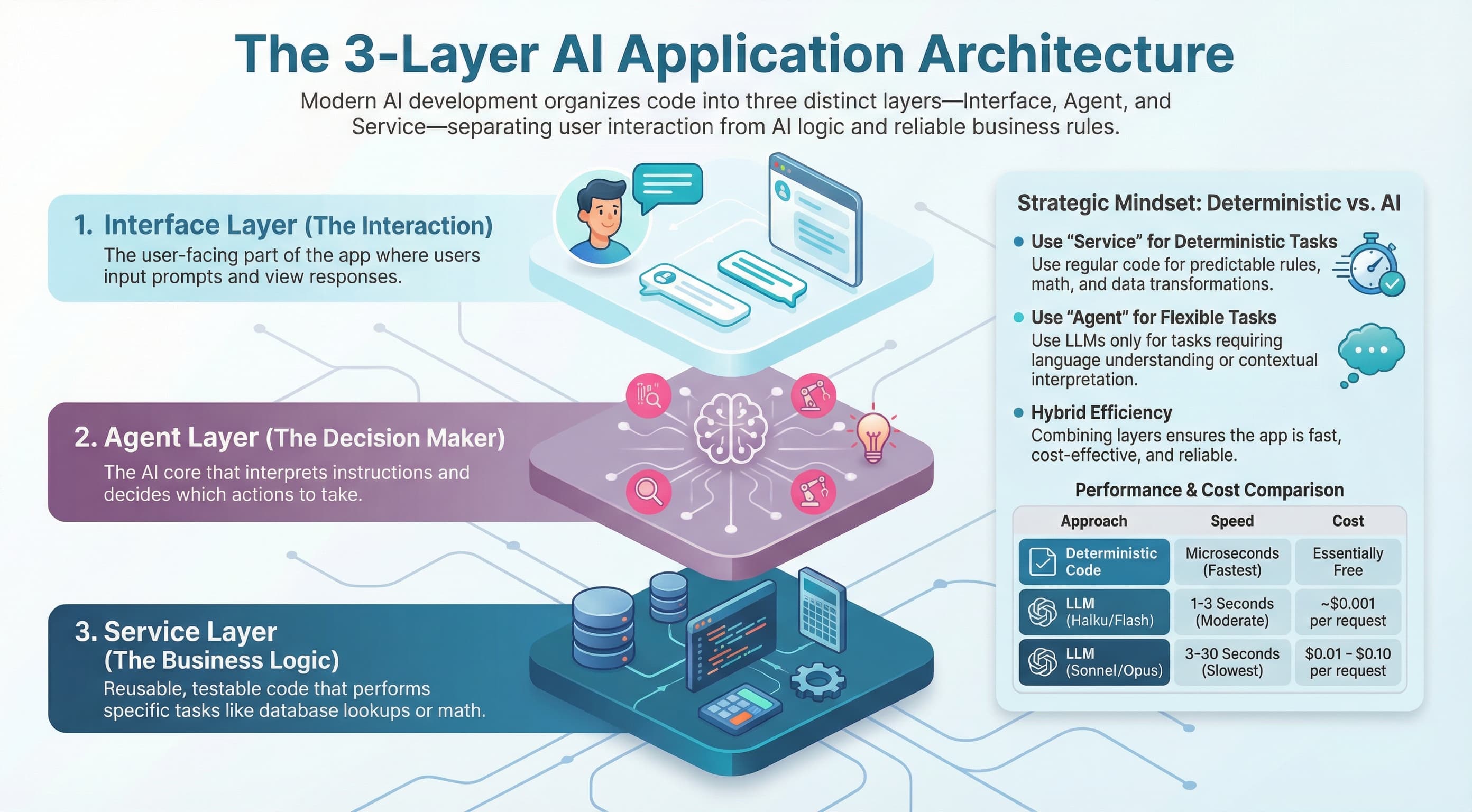
TL;DR
Organize code into three layers: Interface (what users see), Agent (AI decision-making), and Service (business logic). Each layer has one job. This separation makes code reusable, testable, and maintainable.
What Each Layer Does
Interface Layer
- • Displays information to users
- • Collects user input
- • Calls services or agents
- • Handles authentication
Examples: Streamlit, FastAPI, CLI
Agent Layer
- • Interprets natural language
- • Decides which tools to call
- • Orchestrates multi-step tasks
- • Returns results to interface
Examples: Pydantic.ai agents
Service Layer
- • Contains all business logic
- • Handles database operations
- • Calls external APIs
- • Performs calculations
Examples: ContactService, UserService
Why Separation Matters
Reusability
Your ContactService can be used by the Streamlit UI, an API endpoint, an AI agent, a CLI tool, and scheduled jobs. Write the logic once, use it everywhere.
Testability
Services are deterministic—same input, same output. You can test them without involving AI or UI:
def test_contact_service():
    service = ContactService(mock_db)
    contact = service.create_contact(name="Test", email="test@example.com")
    assert contact.name == "Test"
Maintainability
Need to change how contacts are stored? Update the service. The UI and agents don't change. Need a new UI? Build it. The services and agents stay the same.
6Services - Your Business Logic
TL;DR
Services are classes that contain your business logic. They handle database operations, calculations, and external API calls. Services are reusable, testable, and the backbone of your infrastructure.
What Belongs in a Service?
Put logic in a service when it:
- Touches the database
- Calls an external API
- Performs business calculations
- Should be reusable across your app
Service Structure Pattern
# services/contact_service.py

from typing import Optional
from datetime import datetime, timedelta
from supabase import Client
from models import Contact

class ContactService:
    """Service for contact management operations."""

    def __init__(self, db: Client):
        self.db = db

    def get_contact(self, contact_id: str) -> Optional[Contact]:
        """Get a single contact by ID."""
        result = self.db.table("contacts").select("*").eq("id", contact_id).execute()
        if not result.data:
            return None
        return Contact(**result.data[0])

    def create_contact(self, name: str, email: str, phone: Optional[str] = None) -> Contact:
        """Create a new contact."""
        data = {
            "name": name,
            "email": email,
            "phone": phone,
            "created_at": datetime.now().isoformat()
        }
        result = self.db.table("contacts").insert(data).execute()
        return Contact(**result.data[0])
Key Principles
Dependencies are Injected
Don't create the database client inside the service. Pass it in:
# Good - dependency injected
class ContactService:
    def __init__(self, db: Client):
        self.db = db

# Bad - creates its own dependency
class ContactService:
    def __init__(self):
        self.db = create_client(url, key)  # Hard to test!
Return Pydantic Models
Always return typed data, not raw dictionaries. This gives you autocomplete, validation, and self-documenting code.
7Thin Tools - The Bridge to AI
TL;DR
Tools are functions that agents can call. The critical rule: tools should be thin—they call services, they don't contain business logic. This keeps logic reusable and testable.
The Thin Tools Rule
Tools call services. Tools don't contain logic.
# ✅ CORRECT: Tool is thin, calls service
@agent.tool()
async def get_recent_contacts(
    ctx: RunContext[AgentDependencies],
    days: int = 7
) -> list[Contact]:
    """Get contacts created in the last N days."""
    return ctx.deps.contact_service.get_recent_contacts(days)


# ❌ WRONG: Tool contains business logic
@agent.tool()
async def get_recent_contacts(
    ctx: RunContext[AgentDependencies],
    days: int = 7
) -> list[Contact]:
    # Don't do this! Logic belongs in service
    cutoff = datetime.now() - timedelta(days=days)
    result = ctx.deps.db.table("contacts").select("*").gte("created_at", cutoff.isoformat()).execute()
    return [Contact(**row) for row in result.data]
Why This Matters
If logic is in the tool, you can only use it through the agent.
If logic is in the service, you can use it through the agent (via tool), through the UI (directly), through the API (directly), in tests (directly), and in scheduled jobs (directly).
Tool Docstrings Matter
The LLM reads tool docstrings to decide when to use each tool. Be clear and specific:
@agent.tool()
async def search_contacts(
    ctx: RunContext[AgentDependencies],
    query: str
) -> list[Contact]:
    """
    Search for contacts by name or email.

    Use this when the user wants to find specific contacts based on
    a search term. The search is case-insensitive and matches partial
    names or email addresses.

    Args:
        ctx: Agent context with dependencies
        query: Search term to match against name or email

    Returns:
        List of matching contacts, empty if none found
    """
return ctx.deps.contact_service.search(query)8Pydantic.ai Essentials
TL;DR
Pydantic.ai is a framework for building AI agents. You create an agent with a model and system prompt, add tools it can call, and run it with user input. The agent decides which tools to use.
Creating an Agent
from pydantic_ai import Agent
from agent.dependencies import AgentDependencies

contact_agent = Agent(
    "anthropic:claude-sonnet-4-5-20250929",
    deps_type=AgentDependencies,
    system_prompt="""You are a helpful contact management assistant.

    You can help users:
    - Find contacts by searching names or emails
    - View recent contacts
    - Get summaries of contact information

    Always be concise and helpful."""
)
AgentDependencies
Dependencies are how tools access services. It's a class that holds all the services an agent might need:
# agent/dependencies.py

from dataclasses import dataclass
from services.contact_service import ContactService
from core.database import get_supabase_client

@dataclass
class AgentDependencies:
    """Container for all services available to agent tools."""
    contact_service: ContactService

    @classmethod
    def create(cls) -> "AgentDependencies":
        """Factory method to create dependencies with real services."""
        db = get_supabase_client()
        return cls(contact_service=ContactService(db))
Running an Agent
import asyncio
from agent.contact_agent import contact_agent
from agent.dependencies import AgentDependencies

async def main():
    deps = AgentDependencies.create()

    result = await contact_agent.run(
        "Show me all contacts from last week",
        deps=deps
    )

    print(result.data)

asyncio.run(main())
Multiple Agents vs. One Agent
Start with one agent. Split into multiple specialized agents when it starts getting confused with too many tools (15-20+). Multiple agents need an orchestrator to route requests.
9Prompt Engineering Basics
TL;DR
How you write system prompts and tool docstrings determines how well your agent works. Be specific, give examples, and iterate based on what you observe.
System Prompts
system_prompt="""You are a contact management assistant for a sales team.

Your primary responsibilities:
- Help users find and manage their contacts
- Provide quick summaries of contact information
- Suggest follow-up actions based on contact history

Guidelines:
- Be concise - sales people are busy
- Always confirm before deleting anything
- If a search returns no results, suggest broadening the search
- Format contact lists as bullet points for easy scanning

You have access to tools for searching, viewing, and managing contacts.
Use them based on what the user needs."""
What to Include
| Element | Purpose |
|---|---|
| Role | Who is the agent? ("contact management assistant") |
| Audience | Who is it helping? ("sales team") |
| Responsibilities | What can it do? |
| Guidelines | How should it behave? |
| Constraints | What should it avoid? |
Iteration Process
Prompts rarely work perfectly the first time. Iterate:
- Write initial prompt
- Test with real queries
- Observe what goes wrong
- Refine the prompt
- Repeat
10Deterministic vs. Agent Decision-Making
TL;DR
Deterministic code always does the same thing. Agent-driven code lets the LLM decide. Use deterministic for known workflows and cost-sensitive operations. Use agents for flexible, language-based tasks.
When to Use Deterministic
| Situation | Example |
|---|---|
| Known workflow | "Every morning, pull data, generate report, send email" |
| Compliance requirements | "These steps must happen in this order" |
| Cost-sensitive | Processing 10,000 items—can't afford LLM calls each |
| Speed-critical | Response needed in milliseconds |
When to Use Agent-Driven
| Situation | Example |
|---|---|
| Natural language input | User asks questions in their own words |
| Flexible tasks | "Help me with this contact" (what kind of help?) |
| Exploration | "What can you tell me about our sales?" |
| Complex judgment | "Summarize the key points from these emails" |
The Cost Reality
| Approach | Time | Cost per operation |
|---|---|---|
| Deterministic | Microseconds | ~Free |
| Agent (Haiku) | 1-3 seconds | ~$0.001 |
| Agent (Sonnet) | 3-10 seconds | ~$0.01 |
| Agent (Opus) | 10-30 seconds | ~$0.10 |
Rule
Don't use an agent for something a simple function can do. Processing 10,000 items with Sonnet = hours and $100+. With deterministic code = instant and free.
11CLAUDE.md for Real Projects
TL;DR
CLAUDE.md is your instruction file for Claude Code. Document your architecture, patterns, and rules. Include efficiency guidelines, checkpoint instructions, and refactoring triggers.
Efficiency Rules
## Efficiency Rules

### Don't Duplicate
- Before creating a new function, check if similar functionality exists
- Before creating a new table, check the existing schema
- Prefer extending existing code over creating new files

### Check Before Creating
- Run `grep -r "function_name" .` to check if something exists
- Check Supabase schema before adding tables or columns
- Review similar files before creating new ones

### Ask Before Big Changes
- Ask before major refactors
- Ask before changing database schemas
- Ask before adding new dependencies
Refactoring Guidance
## Refactoring Guidelines

### When to Refactor
- Files over ~200 lines → consider splitting
- Functions over ~50 lines → consider breaking down
- Same code in multiple places → extract to shared function
- Hard to find things → reorganize

### How to Refactor
Ask: "This file is getting large. Help me refactor it into smaller,
focused modules while maintaining the same functionality."
Checkpoints
## Checkpoints

Long conversations lose context. Save progress regularly.

### When to Checkpoint
- After completing a major feature
- Every ~50K tokens (Claude will estimate)
- Before starting a different area of work

### How to Checkpoint
Ask: "Save a checkpoint of our progress to docs/checkpoints/"12Security Essentials
TL;DR
Never commit API keys. Validate user input. Don't trust LLM output blindly. These basics prevent most security issues.
Never Commit API Keys
API keys in your code = API keys stolen.
# .env (never committed)
ANTHROPIC_API_KEY=sk-ant-xxxxx
SUPABASE_URL=https://xxx.supabase.co
SUPABASE_KEY=your-key-here

# .gitignore (always committed)
.env

# In your code
import os
from dotenv import load_dotenv

load_dotenv()
api_key = os.getenv("ANTHROPIC_API_KEY")
Security Checklist
.envis in.gitignore- No API keys in code files
- User input is validated
- Database queries use parameters (not string concatenation)
- LLM output is validated before use
- Error messages don't expose sensitive details
13Troubleshooting & Debugging
TL;DR
Errors are normal. Read error messages (the last line is usually key). Use Logfire MCP so Claude Code can see your logs. Take screenshots for visual issues.
Reading Error Messages
The most important line is usually last:
Traceback (most recent call last):
  File "app.py", line 42, in main
    result = process_data(data)
  File "processor.py", line 15, in process_data
    return data["email"]
KeyError: 'email'                    ← THIS is the actual problem
Error Handling & Retries
import time

async def call_agent_with_retry(prompt: str, max_retries: int = 3):
    for attempt in range(max_retries):
        try:
            return await agent.run(prompt, deps=deps)
        except Exception as e:
            if attempt == max_retries - 1:
                raise  # Give up after max retries
            print(f"Attempt {attempt + 1} failed: {e}. Retrying...")
            time.sleep(2 ** attempt)  # Exponential backoff
Setting Up Logfire MCP
Logfire MCP lets Claude Code access your application logs directly. Ask Claude Code:
"Help me install and configure the Logfire MCP server so you can access my application logs and help me debug issues."
The Debugging Prompt Template
Here's the error:
[paste the full error message]

Here's what I was trying to do:
[explain the goal]

Here's the relevant code:
[paste the code section]

Here's a screenshot (if relevant):
[attach or reference file]

What I've already tried:
[list attempts]
Common Issues and Fixes
| Error | Likely cause | Fix |
|---|---|---|
ModuleNotFoundError | Venv not activated | source .venv/bin/activate |
KeyError on env var | .env not loaded | Check .env file exists |
Connection refused | Wrong credentials | Verify .env values |
ValidationError | Data shape mismatch | Check model vs data |
14Hands-On Project - Contact Manager
TL;DR
Build a complete system using every pattern from this guide: Streamlit UI + Supabase database + Service layer + Pydantic.ai agent + Logfire monitoring, deployed to Railway.
Project Structure
contact-manager/
├── CLAUDE.md                    # Development guidelines
├── .env.example                 # Environment template
├── .gitignore
├── requirements.txt
├── contact_manager/
│   ├── __init__.py
│   ├── models.py                # Pydantic models
│   ├── core/
│   │   ├── config.py            # Configuration
│   │   └── database.py          # Supabase client
│   ├── services/
│   │   └── contact_service.py   # Business logic
│   ├── agent/
│   │   ├── dependencies.py      # AgentDependencies
│   │   └── contact_agent.py     # Agent + tools
│   └── ui/
│       └── app.py               # Streamlit interface
└── docs/
    └── checkpoints/             # Progress checkpoints
Step-by-Step Build
Use these prompts with Claude Code to build each piece:
Step 1: Project Setup
Prompt to Claude Code:
"Create a new project called contact-manager with the structure for a 3-layer architecture. Include requirements.txt with streamlit, anthropic, pydantic-ai, supabase, python-dotenv, logfire. Add .env.example, .gitignore, and a CLAUDE.md with efficiency rules."
Step 2: Pydantic Models
Prompt to Claude Code:
"Create contact_manager/models.py with a Contact Pydantic model. Include: id (str), name (str), email (str), phone (optional str), notes (str, default empty), created_at (datetime), updated_at (datetime)."
Step 3: Database Setup
Create the table in Supabase SQL Editor:
CREATE TABLE contacts (
    id UUID PRIMARY KEY DEFAULT gen_random_uuid(),
    name TEXT NOT NULL,
    email TEXT NOT NULL,
    phone TEXT,
    notes TEXT DEFAULT '',
    created_at TIMESTAMPTZ DEFAULT NOW(),
    updated_at TIMESTAMPTZ DEFAULT NOW()
);

CREATE INDEX idx_contacts_email ON contacts(email);
Steps 4-9: Continue Building
Continue with prompts for: ContactService (Step 4), AgentDependencies (Step 5), ContactAgent with tools (Step 6), Streamlit UI (Step 7), Logfire monitoring (Step 8), and Railway deployment (Step 9).
Testing Your Build
After each step: python3 -m py_compile contact_manager/[file].py to verify syntax. For the UI: streamlit run contact_manager/ui/app.py
15What's Next?
You now have a solid foundation: the 3-layer architecture, reusable services, agents with thin tools, and the judgment to choose between AI and deterministic code.
Where to Go From Here
Multi-Agent Orchestration
When one agent isn't enough, create multiple specialized agents with a router that directs requests to the right specialist.
Pydantic-Graph
For complex deterministic multi-step workflows with branching, error handling, and human checkpoints.
Production Concerns
Rate limiting, caching, cost monitoring, and background jobs for long-running tasks.
Building MCP Servers
Create your own MCP servers so Claude Code can interact with your custom tools and data sources.
Keep Building
The best way to learn is to build things. Ideas:
- Add more features to your Contact Manager
- Build a second agent for a different domain
- Connect your system to external APIs
- Create dashboards and reports
Every project teaches you something new. You now have the patterns—go apply them.
Resources
Want to go deeper? Check out the Pydantic.ai documentation and the Anthropic cookbook.
Missed Part 1?
Go back to the foundations: environment setup, understanding LLMs, and building your first chatbot.
←Part 1: Getting Started with Claude Code