What You'll Learn
This guide will take you from complete beginner to building and deploying your first AI-powered application. By the end, you'll have a working chatbot live on the internet.
What's Included:
- ✨Complete development environment setup
- ⚡Understanding LLMs and when to use them
- 🔧Essential platforms: GitHub, Supabase, Railway
- 🛡️Hands-on project: Build a chatbot
By The End, You'll Be Able To:
- 📊Set up a professional development environment
- 🤖Build AI applications with Claude Code
- 💾Store data in Supabase
- 🚀Deploy applications to the cloud
Time commitment: 25 minutes to read, 1-2 hours to build your first chatbot
1The AI Development Revolution
TL;DR
Claude Code is an AI assistant that writes code for you. You describe what you want in plain English, and it builds it. This has fundamentally changed who can create software.
What is Claude Code?
Claude Code is a command-line tool made by Anthropic (the company behind Claude) that lets you build software by having a conversation. Instead of writing code yourself, you describe what you want, and Claude writes it for you.
Think of it like having a very skilled programmer sitting next to you who:
- Never gets tired or frustrated
- Knows almost every programming language and framework
- Can explain what it's doing in plain English
- Works at the speed you can describe your ideas
How AI Changed Software Development
The old way (pre-2023):
- Have an idea
- Spend months/years learning to code
- Build the thing (slowly, with lots of frustration)
- Debug for weeks
- Maybe ship something
The new way:
- Have an idea
- Describe it to Claude Code
- Review what it built
- Ask for changes
- Ship it
Why This Matters For You
If you're good at Excel, you already have the most important skill: logical thinking. You know how to break problems into steps, think about data flowing from inputs to outputs, and debug when formulas don't work. These skills transfer directly to AI development.
2Why Python?
TL;DR
Python is the language of AI. It reads like English, has libraries for everything, and Claude Code writes it fluently. You won't write much Python directly—but understanding why we use it helps you make better decisions.
Python Reads Like English
Compare these two snippets that do the same thing:
Python:
if user_age >= 18:
    print("You can vote")
else:
    print("Too young to vote")
Python strips away the ceremony. You can often read Python code and understand what it does, even if you've never programmed before.
The Ecosystem
Python has libraries (pre-written code packages) for almost everything:
anthropic- Talk to Claudeopenai- Talk to GPTstreamlit- Build web interfacessupabase- Connect to databasespandas- Work with data (like Excel on steroids)
The Excel Connection
You already think in a way that maps to Python:
| Excel Concept | Python Equivalent |
|---|---|
| Cell formula | Variable assignment |
| IF() function | if/else statement |
| VLOOKUP() | Dictionary lookup |
| Pivot table | pandas groupby |
| Macro | Function |
Key Insight
Claude Code writes the Python for you. Your job is to describe what you want clearly, review what Claude built, test that it works, and ask for changes if needed. You'll read Python more than you write it—and reading is much easier than writing.
3The Development Mindset
TL;DR
Professional developers follow a simple cycle: Research → Plan → Execute → Test. Following this process—and teaching Claude Code to follow it—is the difference between frustration and success.
The Four-Step Cycle
RESEARCH → PLAN → EXECUTE → TEST
(repeat as needed)
Step 1: Research
Before building anything, understand what you're building.
- What problem are you solving?
- Has someone solved this before?
- What tools/libraries exist for this?
- What are the common pitfalls?
Using Claude Code for Research
You can ask Claude Code research questions before writing any code:
"I want to build a chatbot that saves conversations to a database. What's the best approach? What libraries should I use? What are common pitfalls?"
Step 2: Plan
Break the big thing into small things. Don't try to build everything at once.
Example plan for a chatbot:
- Create a basic Streamlit page with a text input
- Connect to Claude API and get a response
- Display the response on the page
- Add conversation history
- Save conversations to Supabase
- Deploy to Railway
Claude Code's Plan Mode
Claude Code has a built-in Plan Mode. Ask:
"Let's go into plan mode. I want to build X. Help me think through the approach before we write any code."
Step 3: Execute
Build one piece at a time. Take the first item from your plan and build it. Nothing else.
When working with Claude Code, be specific:
- Bad: "Build me a chatbot"
- Good: "Create a Streamlit page with a text input field and a submit button. When the user clicks submit, print whatever they typed."
Step 4: Test
Verify it works before moving on.
- Run the code
- Try to break it (enter weird inputs, click buttons twice, etc.)
- Fix any issues
- Then—and only then—move to the next piece
Why This Matters
Small steps = small problems. If something breaks, you know exactly where to look. Big steps = big problems you can't diagnose.
4Your Toolkit
TL;DR
You need five platforms: GitHub (store code), Supabase (store data), Railway (run your app), Streamlit (build interfaces), and Logfire (see what's happening). All have free tiers.
GitHub: Your Code's Home
GitHub is where your code lives. Think of it as Google Drive for code, but with superpowers.
What is version control? Remember how Google Docs shows you revision history? Git (the technology) and GitHub (the website) do this for code—but better. Every save is called a "commit," and you can see exactly what changed in each one.
Supabase: Your Database
A database is a super-powered spreadsheet in the cloud.
| Excel | Database |
|---|---|
| Workbook | Database |
| Sheet | Table |
| Row | Row |
| Column | Column |
Supabase gives you PostgreSQL (the most respected database), plus authentication, storage, and real-time capabilities.
Railway: Your Server
Your laptop can run code, but it's not always on. A server is a computer in a data center that runs 24/7, has a public address anyone can access, and handles multiple users simultaneously.
Railway watches your GitHub repo. When you push new code, it automatically redeploys. Magic.
Streamlit: Your User Interface
Streamlit lets you build web apps entirely in Python:
import streamlit as st

st.title("My First App")
name = st.text_input("What's your name?")
if st.button("Say Hello"):
    st.write(f"Hello, {name}!")
That's it. That's a complete web app. No HTML, no CSS, no JavaScript.
Logfire: Your Monitoring
When your app runs on a server, you can't see what's happening. Logfire lets you see logs, track errors, measure performance, and get alerts when something breaks.
5Setting Up Your Environment
TL;DR
Install VS Code and Claude Code first—then Claude Code can help you install Python and set everything else up. Create accounts on GitHub, Supabase, Railway, and Logfire.
Step 1: Install a Code Editor
Download VS Code from code.visualstudio.com and install the Python extension.
Alternatively, try Cursor from cursor.com — it's VS Code with built-in AI features.
Step 2: Install Claude Code
# Install Node.js first if you don't have it
brew install node  # Mac
# For Windows, download from nodejs.org

# Install Claude Code
npm install -g @anthropic-ai/claude-code

# Verify installation
claude --version
Navigate to any folder and run claude. It will ask for your Anthropic API key from console.anthropic.com.
Now Claude Code can help!
With Claude Code installed, ask it to help you install Python and set up the rest of your environment.
Step 3: Install Python (with Claude Code's help)
Ask Claude Code:
"Help me install Python 3.11 on my Mac using pyenv. Walk me through each step and verify it's working."
Step 4: Create Platform Accounts
- GitHub: github.com
- Supabase: supabase.com
- Railway: railway.app
- Logfire: pydantic.dev/logfire
- Anthropic: console.anthropic.com
Step 5: Project Setup (Let Claude Code do it)
Ask Claude Code:
"Set up the basic project structure for a Python AI project. I need requirements.txt, .env.example, .gitignore, and an empty app.py file."
Always Activate Your Virtual Environment
Before working on your project, run source .venv/bin/activate (Mac/Linux) or .venv\Scripts\activate (Windows). Add this reminder to your CLAUDE.md file!
6Understanding AI & LLMs
TL;DR
LLMs (Large Language Models) are AI systems trained on text that can generate human-like responses. Different models have different strengths. Claude is best for coding, GPT for general tasks, Gemini for images. Bigger models are smarter but slower and more expensive.
What is an LLM?
LLM stands for Large Language Model. When you type "The capital of France is", the model predicts that "Paris" is the most likely next word. It does this based on patterns it learned during training.
That's all it does: predict the next token. But when you do this really well, at massive scale, something remarkable happens—the model can answer questions, write code, and have conversations.
Important: They're not "thinking"
LLMs don't understand the way humans do. They're sophisticated pattern matchers. They can be confidently wrong, hallucinate facts, and work better with clear prompts.
The Major Players
Note: AI models update frequently! Check provider docs for the latest.
Claude (Anthropic)
Best for: Coding, long documents, reasoning, following complex instructions
| Model | Speed | Best for |
|---|---|---|
| Claude Opus 4.6 | Slow | Complex reasoning |
| Claude Sonnet 4.5 | Medium | General use, coding |
| Claude Haiku | Fast | Quick tasks |
ChatGPT (OpenAI)
Best for: General tasks, embeddings, broad knowledge
Gemini (Google)
Best for: Images, video analysis, multimodal applications
Choosing the Right Model
| Task | Recommended |
|---|---|
| Writing code | Claude Sonnet |
| Complex reasoning | Claude Opus |
| Quick simple tasks | Claude Haiku or Gemini Flash |
| Image/video analysis | Gemini Pro |
| Embeddings/similarity | OpenAI |
7LLM vs Deterministic
TL;DR
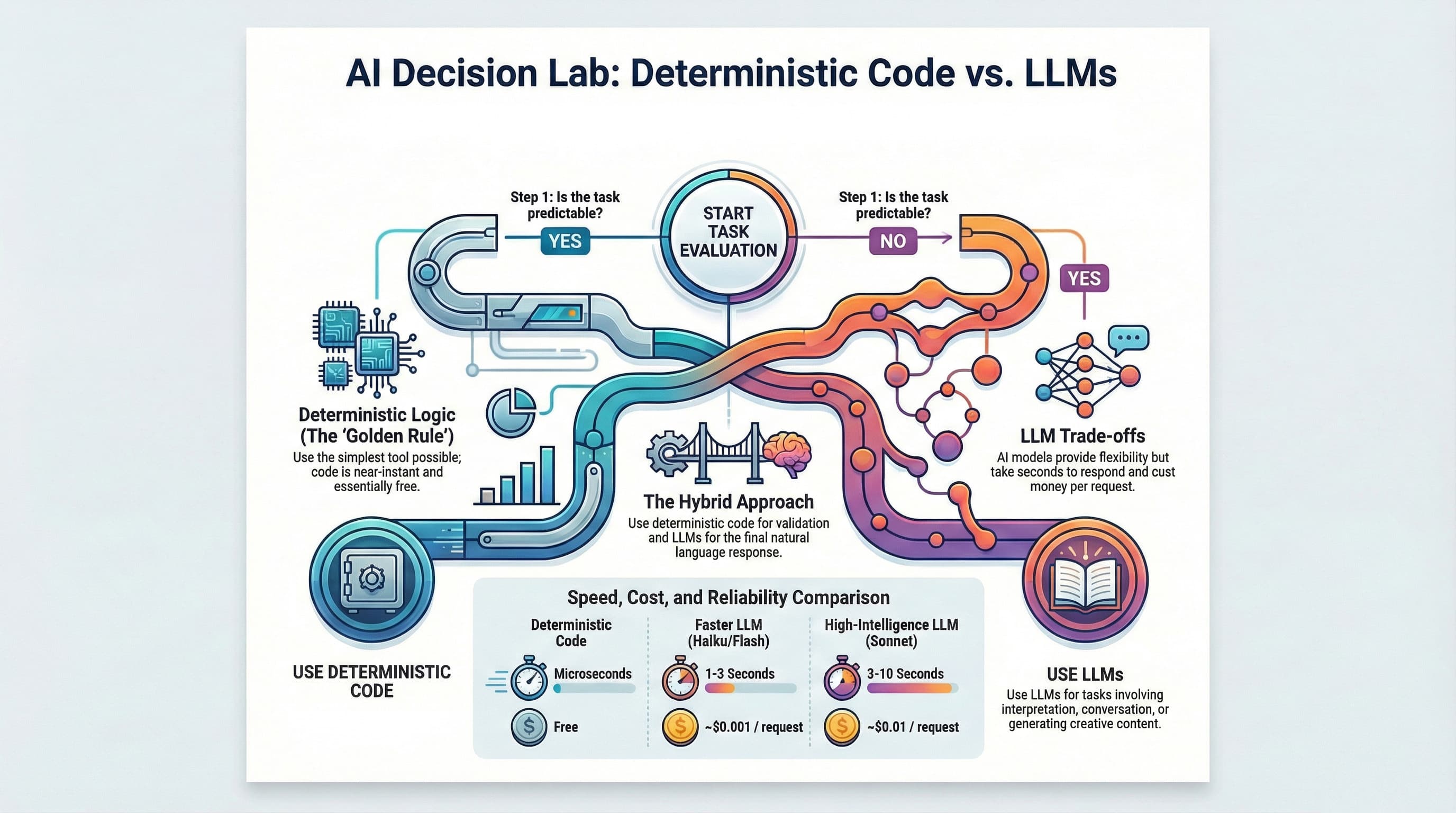
Use regular code for predictable tasks (math, validation, data transformation). Use LLMs for tasks requiring flexibility or language understanding. LLMs are slow and expensive—don't use them when simple code works.
What is "Deterministic"?
Deterministic means: same input → same output, every time.
# Deterministic: 2 + 2 is always 4
def add(a, b):
    return a + b

add(2, 2)  # Always returns 4
When to Use What
Use Deterministic Code When:
- Calculate a total → Deterministic
- Validate an email format → Deterministic
- Convert CSV to JSON → Deterministic
- Apply discount if order > $100 → Deterministic
Use LLMs When:
- Summarize customer feedback → LLM
- Write a personalized email → LLM
- Determine if a review is positive or negative → LLM
- Answer customer questions → LLM
The Cost Reality
If you're processing 10,000 items:
- Deterministic: Instant, free
- LLM (Sonnet): 8+ hours, $100+
The Golden Rule
Use the simplest tool that solves the problem.
8Your First Project: A Simple Chatbot
TL;DR
We'll build a chatbot step-by-step: Streamlit interface → Claude API connection → conversation history → Supabase storage → Railway deployment.
What We're Building
A web-based chatbot that:
- Shows a chat interface
- Sends messages to Claude
- Displays responses
- Remembers conversation history
- Saves conversations to a database
- Runs 24/7 on the internet
Step 1: Project Setup
mkdir simple-chatbot
cd simple-chatbot
python -m venv .venv
source .venv/bin/activate
claude
Prompt to Claude Code:
"Create the basic project structure for a Streamlit chatbot app. I need requirements.txt with streamlit, anthropic, supabase, python-dotenv; .env.example; .gitignore; and an empty app.py file."
Step 2: Basic Streamlit Interface
Prompt to Claude Code:
"In app.py, create a simple Streamlit chat interface with a title, chat input, and message display. For now, just echo back what the user types."
Test it: streamlit run app.py
Step 3: Connect to Claude API
Prompt to Claude Code:
"Now connect the chatbot to Claude. Send user messages to the Claude API and display Claude's response."
Step 4: Add Conversation History
Prompt to Claude Code:
"Add conversation history so Claude remembers previous messages in the session using Streamlit session state."
Step 5: Save to Supabase
First, create a table in Supabase SQL Editor:
CREATE TABLE conversations (
    id UUID PRIMARY KEY DEFAULT gen_random_uuid(),
    session_id TEXT NOT NULL,
    role TEXT NOT NULL,
    content TEXT NOT NULL,
    created_at TIMESTAMPTZ DEFAULT NOW()
);
Prompt to Claude Code:
"Add Supabase integration to save conversations. Generate a unique session ID and save each message."
Step 6: Deploy to Railway
Prompt to Claude Code:
"Create a Procfile and railway.json for Railway deployment."
Then:
- Push to GitHub
- Connect Railway to your repo
- Add environment variables
- Deploy!
What You've Learned
By building this chatbot, you've touched every part of the stack: Python, Streamlit, Claude API, Supabase, Railway, environment variables, and Git/GitHub.
9Common Pitfalls & How to Avoid Them
TL;DR
Most beginners fail by trying to do too much at once, not testing incrementally, ignoring errors, over-engineering, and not reading documentation.
Pitfall 1: Building Too Much at Once
The trap: "Let me build the whole thing, then see if it works."
The fix: Build one small piece. Test it. Then add the next piece.
Pitfall 2: Not Testing Incrementally
The trap: Writing 500 lines of code before running it once.
The fix: Run your code after every few changes. If it was working and now it's not, the bug is in what you just added.
Pitfall 3: Ignoring Error Messages
The trap: "There's an error but it's too confusing."
The fix: Read error messages carefully. The last line usually tells you the actual problem. Copy them into Claude Code and ask for help.
Pitfall 4: Over-Engineering
The trap: Setting up perfect infrastructure before building the feature.
The fix: Make it work first. Make it pretty later.
Pitfall 5: Not Reading Documentation
The trap: Guessing how a library works.
The fix: Spend 10 minutes skimming documentation. Look for "Getting Started" guides.
10Glossary
| Term | Definition |
|---|---|
| API | A way for programs to talk to each other |
| API Key | A password that identifies you when calling an API |
| Commit | A saved snapshot of your code in Git |
| Deploy | Putting your application on a server for others to use |
| Deterministic | Same input always produces same output |
| Environment Variable | A configuration value stored outside your code |
| Git | A version control system that tracks changes to code |
| GitHub | A website that hosts Git repositories |
| Hallucination | When an LLM makes up false information |
| Library | Pre-written code you can use in your project |
| LLM | Large Language Model—AI trained on text data |
| Local | Running on your own computer |
| Prompt | The text you send to an LLM |
| Repository | A project folder tracked by Git |
| Server | A computer that runs 24/7 and serves requests |
| Token | A piece of text (~3/4 of a word) that LLMs process |
| Virtual Environment | An isolated Python environment for a project |
11What's Next?
You now have the foundation. You can set up a development environment, build simple AI applications, deploy them for others to use, and make informed decisions about when to use AI.
Continue to Part 2
Ready to level up? Part 2 covers the patterns that scale:
- The 3-Layer Architecture — Interface, Agent, Service
- Pydantic.ai — Building agents with tools
- Services & Thin Tools — Reusable, testable code
- Hands-On Project — Build a Contact Manager with AI
Want to automate without code?
If you're interested in building automation systems for your ecommerce business without writing code, check out my step-by-step guide on workflow automation with n8n:
Beginner's Guide to Automating Workflows for Ecommerce →Keep Building
The best way to learn is to build things. Ideas to try:
- Modify your chatbot to focus on a specific topic
- Add a feature to export conversations
- Build a simple data dashboard
- Create a tool that summarizes documents
Every Project Teaches You Something
Start small, iterate, and don't be afraid to break things. Good luck!